 Nextiva Blog
 Customer service software brings customer conversations, support workflows, automation, and performance data together in one system. The right platform gives agents the context they need to manage customer queries and resolve requests faster. It also gives managers greater control over call routing, service levels, quality, and costs.
However, these platforms vary widely in scope. Some focus on email ticketing or live chat, while others combine customer support software with voice, messaging, social media, CRM data, workforce management, and AI agents. A platform built for a five-person support team may not provide the governance, integrations, reporting, or capacity that a regional contact center requires.
This guide compares 17 customer service software platforms for growing, mid-market, and enterprise businesses. It covers pricing, free plans, AI capabilities, ideal company size, advantages, limitations, and the use cases each customer support tool handles best.
Evaluating contact centers? Get the buyer’s guide.
This guide reveals the five pillars of a modern platform, key questions to ask, and red flags to avoid.
Best Customer Service Software in 2026 Compared
The table below gives you a quick comparison of the 17 platforms covered in this guide. AI-native describes platforms built around autonomous AI agents or AI-led resolution. AI-assisted platforms primarily use AI to support human agents with summaries, recommendations, routing, and content generation. Many platforms now combine both approaches.
| Customer service software | Best for | Starting price | Free tier | AI approach | Best company size |
|---|---|---|---|---|---|
| Nextiva | Unified voice and digital customer service | $15 per user/month, billed annually | No | AI-assisted with autonomous AI options | Growing, mid-market, and enterprise |
| Zendesk | Scalable omnichannel ticketing | $19 per agent/month, billed annually | No | AI-assisted and AI-native | Mid-market and enterprise |
| Salesforce Service Cloud | CRM-connected enterprise service | $25 per user/month | No | AI-assisted and AI-native | Mid-market and enterprise |
| Freshdesk | Accessible help desk and omnichannel service | Free; paid plans from $19 per agent/month, billed annually | Yes, for up to two agents | AI-assisted and AI-native | Small and mid-market |
| HubSpot Service Hub | Customer service connected to HubSpot CRM | Free; paid plans from $20 per seat/month | Yes, for up to two users | AI-assisted with autonomous AI options | Growing and mid-market |
| Intercom | AI-first conversational support | $29 per seat/month plus AI usage | No | AI-assisted and AI-native | Growing and mid-market |
| ServiceNow CSM | Complex enterprise service workflows | Custom quote | No | AI-assisted and AI-native | Enterprise |
| Zoho Desk | Cost-conscious omnichannel ticketing | Free; paid plans from $7 per agent/month, billed annually | Yes, for up to three agents | Primarily AI-assisted | Small and mid-market |
| Help Scout | Shared inboxes and personalized support | Free; paid plans from $25 per user/month | Yes, for up to five users | AI-assisted with AI resolution | Small and mid-market |
| Gorgias | Ecommerce customer service | $40 per month | No | AI-assisted and AI-native | Small and mid-market ecommerce |
| Front | Collaborative customer communication | $25 per seat/month, billed annually | No | AI-assisted and AI-native | Growing and mid-market |
| LiveAgent | Multichannel support with live chat and voice | $15 per agent/month, billed annually | No; 30-day trial available | AI-assisted and AI-native | Small and mid-market |
| Gladly | Customer-centered retail service | Custom quote | No | AI-assisted and AI-native | Mid-market and enterprise |
| HappyFox | Configurable help desk workflows | $24 per agent/month, billed annually | No; 14-day trial available | AI-assisted and AI-native | Mid-market and enterprise |
| Tidio | Website chat and AI support | Free; paid plans from $24.17 per month | Yes | AI-assisted and AI-native | Small and growing businesses |
| TeamSupport | B2B customer support | $45 per month, billed annually | No | Primarily AI-assisted | Mid-market B2B |
| Helpshift | In-app and mobile customer service | Custom quote | No | AI-assisted and AI-native | Mid-market and enterprise |
Starting prices do not provide a complete cost comparison. Some vendors charge separately for AI resolutions, messaging volume, telephony, advanced reporting, sandbox environments, workforce management, onboarding, or premium support.
How We Chose These Customer Service Software Tools
We compared these customer service software platforms using publicly available information, pricing pages, integration directories, free trials, and recent third-party customer reviews. We evaluated each platform using five criteria:
- AI capabilities: We reviewed customer-facing AI agents, agent assistance, conversation summaries, response generation, intelligent routing, knowledge retrieval, and escalation to a human agent. We also considered whether each platform follows an AI-native or AI-assisted model or supports both approaches.
- CRM and business integrations: We assessed how each platform connects with existing CRM systems, ecommerce, billing, order management, collaboration, telephony, and other tools. We also examined whether these integrations simply display information or can update records and trigger workflows.
- Pricing and total cost: We compared published starting prices, billing terms, minimum seat requirements, AI usage fees, and common add-ons. Many enterprise vendors use custom pricing, so businesses should request a complete quote based on their expected number of agents, service channels, and interaction volume.
- Scalability: We considered how well each platform can support larger teams, higher conversation volumes, multiple channels, several departments, complex permissions, and advanced reporting as a business grows.
- Free tier and trial availability: We checked whether each provider offers a permanent free plan or limited trial that teams can use to assess usability and core workflows before making a purchase.
We reviewed the essential features advertised by each software provider, but we also considered usability, implementation requirements, and possible additional costs.
17 Best Customer Service Software
Here are 17 customer service software platforms for growing, mid-market, and enterprise businesses with an established market presence.
1. Nextiva

Obviously, we would lead with Nextiva. We use it; we’ve built it. Over 100,000 businesses depend on it. Nextiva is a recognized, leading unified customer experience management (UCXM) platform, offering intelligent tools within the Nextiva environment.
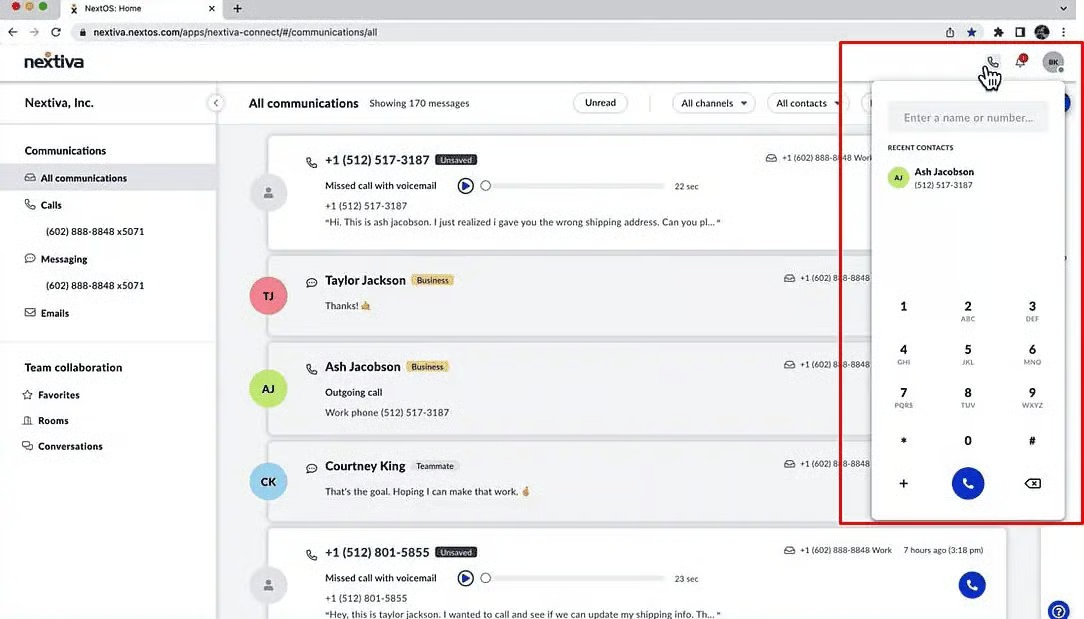
Nextiva brings business communications, contact center operations, and customer interaction management into one platform. It suits businesses that want to manage voice, email, messaging, web chat, social media, and reviews without piecing together several disconnected products.
Nextiva is particularly useful for growing and mid-market businesses that still handle a large share of customer support by phone. Many traditional help desks manage digital tickets well but require a separate phone system or third-party contact center integration. Nextiva combines business phone service with routing, automation, customer context, analytics, and contact center tools.
Nextiva can centralize customer support operations and reduce the need to combine separate communication and service platforms. Agents can manage customer interactions through a shared interface instead of switching between separate phone, chat, and customer management tools. They can respond quickly, maintain consistent support across channels, and use customer context to deliver personalized assistance.
Key features
- Business phone system: Enterprise-grade VoIP phone service with intelligent auto-attendant, call routing, voicemail-to-email transcription, and intuitive mobile/desktop apps for anywhere communication.
- Contact Center as a Service (CCaaS): Comprehensive omnichannel routing across voice, email, chat, and SMS channels, supported by intelligent virtual agents (IVAs), advanced call management, workforce optimization tools, and real-time analytics dashboards.
- AI-powered conversation management: Uses AI for call transcription, conversation summaries, agent assistance, intelligent routing, and approved customer-facing automation.
- Sales and service tools: Integrated lead and opportunity management, 360° customer profile tracking, and case management capabilities for a unified customer view to improve relationship management.
- Customer journey orchestration: Helps coordinate customer interactions across channels and route phone calls according to their needs, history, and stage in the journey.
- Collaboration suite: Better team communication through integrated messaging, HD video conferencing, and centralized task management to optimize internal workflows.
- Actionable analytics: Detailed insights into all platform interactions, including call metrics, communication patterns, and service efficiency indicators, enabling continuous improvement.
- Enterprise reliability: Industry-leading 99.999% availability with redundant systems and our unique “Amazing Service” philosophy for responsive support when you need it most.
Nextiva AI capabilities
Nextiva uses AI to summarize calls, transcribe conversations, support routing decisions, analyze interactions, and provide agents with relevant customer context. These capabilities can reduce administrative work, improve agent productivity, and enhance customer support before, during, and after each conversation.
Businesses can also use Nextiva XBert, an AI employee that handles customer conversations and completes approved tasks across voice and digital channels. XBert can answer questions, collect customer information, schedule appointments, update connected business systems, and transfer conversations to a person when necessary.
Nextiva therefore supports both AI-assisted and AI-led customer service. Buyers should confirm which AI features their selected plan includes and which require separate products or usage-based fees.
Nextiva pricing and free tier
Nextiva offers business communication plans for growing teams and separate contact center plans for businesses with more advanced customer service requirements.
Business communication plans:
- Core: Starts at $15 per user per month when billed annually. It includes a unified inbox, VoIP, inbound and outbound calling, SMS, video meetings, call routing, team chat, and mobile apps.
- Engage: Starts at $25 per user per month when billed annually. It adds service automation, intelligent routing, performance insights, toll-free minutes, inbound call center features, live chat, and chatbot capabilities.
- Scale: Starts at $75 per user per month when billed annually. It adds journey orchestration, blended inbound and outbound calling, AI transcription and summaries, and customizable skills-based routing.
Contact center plans:
- Essential: Starts at $75 per agent per month. It includes omnichannel capabilities, journey orchestration, AI transcription and summaries, skills-based routing, voice, and web chat.
- Professional: Uses custom pricing and includes everything in Essential, plus advanced self-service, real-time supervisor support, PCI-DSS-compliant payments, progressive and predictive dialing, and support for additional channels.
- Premium: Uses custom pricing and includes everything in Professional, plus workforce management, unlimited skills-based routing, advanced analytics, unlimited channels, and in-conversation payments.
Nextiva does not advertise a permanent free plan. Businesses should request a quote for the Professional and Premium contact center plans, as the final cost may depend on agent count, channels, integrations, AI requirements, and implementation scope.
Pros and cons
 Pros
Pros
Brings voice and digital service channels together to provide a strong business phone and contact center foundation
Supports growing and distributed teams and reduces the need for separate communication products
Gives businesses a practical path from business phone service to a broader contact center platform
 Cons
Cons
The entry-level plan does not include every customer service or contact center feature
Advanced deployments may require a custom quote
Teams that need only basic email ticketing may not require the full communication suite
Customer rating: 4.5/5
Customer review:
“The text message feature is a game changer! Especially when you are on a call and need to send an important message, such as address, name of business, and other updates. One of the best softphones in the contact center industry I have been able to use, and it works amazingly! I love the interface and quality!”
– Nextiva Review, Stephanie A.
Best for: Growing and mid-market businesses that need integrated voice, digital customer service, contact center capabilities, CRM integrations, and team collaboration in one platform. Ideal for companies that value excellent voice communication while modernizing their customer experience technology.
2. Zendesk

Zendesk is a well-known and widely used customer service platform. It offers a complete suite of tools, including a ticketing system, knowledge base, live chat, call center software, an open & flexible CRM platform, and powerful analytics.
The platform is known for its scalability, extensive integration marketplace, and support for mid-market and enterprise teams managing several channels, workflows, and customer service departments.
Key features
- Omnichannel ticketing: Converts email, chat, messaging, social media, and voice requests into trackable conversations.
- Intelligent routing: Assigns requests according to intent, priority, agent skills, capacity, and availability.
- AI agents and copilot: Resolves approved requests and assists agents with summaries, suggested replies, and recommended actions.
- Knowledge management: Provides customer-facing help centers, internal resources, and article recommendations.
- Reporting and administration: Tracks service performance and provides enterprise controls such as custom roles, audit logs, and sandbox environments.
Zendesk AI capabilities
Zendesk offers AI agents that respond to customers and resolve approved requests across supported channels. Its agent copilot tools can also suggest replies, summarize conversations, retrieve relevant information, predict customer intent, and recommend the next action.
Zendesk combines AI-led customer resolution with AI-assisted workflows for human agents. The plan and add-ons a business chooses determine the available features and level of AI support.
Before choosing Zendesk, review how the company measures and charges for AI usage. Ask what qualifies as an automated resolution, which channels support AI agents, how the platform transfers unresolved conversations to human agents, and whether each handoff preserves the customer’s full context.
Zendesk pricing and free tier
Zendesk offers the following plans when paid annually:
- Support team: $19 per agent per month
- Suite team plan: $55 per agent per month
- Suite professional: $115 per agent per month and includes more advanced features
- Suite enterprise + Copilot: This enterprise plan uses custom pricing
Zendesk does not offer a permanent free plan, but businesses can use its 14-day free trial to test the platform. Businesses should compare the platform’s advanced features with their actual requirements because Copilot, workforce engagement, contact center capabilities, and other optional products may increase the total cost. Check the Zendesk pricing page for current prices and packages.
Pros and cons
Pros
Supports multiple brands, regions, and large service teams
Offers a mature marketplace and partner network
Gives administrators considerable control over service processes
Cons
Advanced AI and enterprise capabilities can increase the total cost
Complex configurations may require dedicated administrators
Add-ons make final costs harder to estimate
Customer rating: 4.3/5
Customer review:
“The biggest impact of Zendesk Support Suite is the ability to have multiple support engineers collaborate on each other’s tickets in real time in a live chat format. This has been a huge gain for knowledge sharing and collaboration!”
Best for: Mid-market and enterprise teams that need scalable omnichannel ticketing, extensive integrations, configurable workflows, and advanced administrative controls.
3. Salesforce Service Cloud

Part of the extensive Salesforce ecosystem, Service Cloud is a powerful, enterprise-grade customer service solution. It leverages the core Salesforce CRM data, providing agents with a 360-degree customer view.
This connected data model is the platform’s main advantage. An agent can review the customer’s account, purchase history, prior cases, sales activity, and other business records without building a separate customer profile in the help desk. Businesses can also create workflows that extend beyond the service department.
The platform offers considerable flexibility, but that flexibility introduces cost and administrative work. Many deployments require implementation partners, Salesforce administrators, custom integrations, data preparation, and ongoing governance.
Key features
- Enterprise case management: Tracks customer issues, ownership, approvals, service levels, and resolution activity.
- CRM-connected service: Gives agents access to customer accounts, sales activity, products, contracts, and previous cases.
- Omnichannel routing: Directs cases and conversations according to priority, skills, workload, and availability.
- Einstein and Agentforce AI: Summarizes cases, drafts responses, recommends knowledge, and completes approved service tasks.
- Workflow and analytics: Automates service processes and reports on case volume, resolution trends, agent activity, and customer outcomes.
Salesforce AI capabilities
Salesforce combines agent assistance with autonomous AI through its Einstein and Agentforce products. These tools can summarize cases, draft responses, categorize requests, recommend knowledge articles, retrieve CRM information, and suggest the next steps.
Agentforce can also access Salesforce data and workflows to complete approved service tasks. This gives businesses more flexibility than a basic chatbot, but they must carefully set permissions, data access, escalation rules, and operational controls.
Buyers should confirm which advanced AI features the core license includes and which require Agentforce, data products, credits, or other add-ons.
Salesforce Service Cloud pricing and free tier
Salesforce offers the following Service Cloud plans:
- Starter Suite: $25 per user per month
- Pro Suite: $100 per user per month
- Enterprise: $175 per user per month, billed annually
- Unlimited: $350 per user per month, billed annually
- Agentforce 1 Service: $550 per user per month, billed annually
Salesforce does not offer a permanent free plan, but trial options are available. Agentforce usage, implementation, integrations, data products, and premium support may increase the total cost. Check the Salesforce Service Cloud pricing page for current packages.
Pros and cons
Pros
Fits companies already invested in Salesforce
Supports complex account structures and approval processes
Has a large implementation and consulting ecosystem
Cons
Implementation and customization can be expensive
Teams may need Salesforce administrators or outside consultants
The interface and product catalog can overwhelm new users
Customer rating: 4.4/5
Customer review:
“Being on the Salesforce platform allows you to centralize all of your customer’s activities. The ability to provide personalized, AI-driven customer service across all channels to increase operational efficiency while deploying high-quality services on a large scale.”
Best for: Mid-market to large enterprises, particularly those already heavily invested in the Salesforce ecosystem, needing a highly customizable, powerful, and integrated customer service solution.
4. Freshdesk

Freshdesk is a popular cloud-based customer service software known for its user-friendly interface and comprehensive feature set suitable for a wide range of businesses. It offers omnichannel support (email, phone, chat, social, messaging), ticketing, automation, a knowledge base, self-service portals, reporting, and AI features. It’s part of the broader Freshworks suite, which includes CRM, ITSM, and HR tools.
Freshdesk can also work well for small customer service teams that need an accessible ticketing system and a path to more advanced omnichannel service. It provides many standard help desk features without the implementation demands associated with some enterprise platforms.
Mid-market buyers should compare Freshdesk and Freshdesk Omni carefully. They have different pricing, channel coverage, and AI packages. A low starting price for the basic help desk may not represent the cost of a full omnichannel deployment.
Key features
- Ticketing and shared inbox: Organizes customer requests into assigned, prioritized, and trackable tickets.
- Freddy AI: Supports automated responses, summaries, suggested replies, intent detection, routing, and knowledge recommendations.
- Workflow automation: Assigns tickets, updates fields, sends notifications, and escalates overdue requests.
- Knowledge base and customer portal: Gives customers access to support content, ticket submission, and request tracking.
- Omnichannel service: Connects email, chat, messaging, social media, and voice through Freshdesk Omni.
Freshdesk AI capabilities
Freshdesk uses Freddy AI to automate customer responses, summarize tickets, suggest replies, detect intent, route requests, and assist agents. Freddy AI Agent can resolve supported requests using approved service content, while Freddy AI Copilot assists agents throughout their work.
AI allowances vary between Freshdesk and Freshdesk Omni plans. Some plans include a set number of AI sessions, while additional sessions and copilot access may cost extra.
Businesses should test Freddy AI with their actual knowledge-base content, unclear questions, policy exceptions, multilingual requests, and cases that require a transfer to a person.
Freshdesk pricing and free tier
Freshdesk offers the following plans when billed annually:
- Free Program: $0 for up to two agents
- Growth: $19 per agent per month
- Pro: $55 per agent per month
- Enterprise: $89 per agent per month
Freshdesk offers a 14-day trial of its paid plans. Freddy AI Copilot, additional AI Agent sessions, day passes, connector tasks, and Freshdesk Omni may increase the total cost. Check the Freshdesk pricing page for current packages.
Where does your CX strategy stand with AI?
Take the AI Maturity assessment to get personalized recommendations on how to enhance your CX.
Pros and cons
Pros
Provides an accessible starting point for teams adopting a help desk
Requires less setup than many enterprise platforms
Offers a free plan for very small teams
Cons
Advanced functions require higher-priced plans
Freshdesk and Freshdesk Omni pricing can cause confusion
Growing teams may need additional Freshworks products
Customer rating: 4.4/5
Customer review:
“Freshdesk is easy to use and gets you up and running in no time. This is handy if you are new to ticketing.”
Best for: Growing and mid-market support teams looking for a user-friendly, feature-rich, and value-oriented omnichannel customer service solution.

5. HubSpot Service Hub

Service Hub is HubSpot’s customer service software offering, built on top of its popular free CRM. Its main strength is its integration with HubSpot’s Marketing Hub, Sales Hub, CMS Hub, and Operations Hub, providing a unified view of the customer across all departments. This support software is particularly relevant for businesses already using HubSpot for sales, marketing, or customer relationship management.
The platform is easy to adopt when HubSpot is already part of your business. It may be less attractive for enterprises that require highly specialized contact center routing, workforce management, or case management outside the HubSpot ecosystem.
Key features
- CRM-connected ticketing: Links tickets with HubSpot contact, company, sales, and marketing records.
- Help desk workspace: Brings tickets, email, chat, and supported messaging conversations into one interface.
- Ticket automation: Assigns, updates, prioritizes, and escalates tickets according to defined rules.
- Breeze AI tools: Assists with conversation summaries, response drafting, knowledge retrieval, and service content.
- Knowledge and feedback tools: Supports self-service content, customer portals, satisfaction surveys, and service reporting.
HubSpot AI capabilities
HubSpot uses AI to summarize records, draft and revise customer communications, retrieve CRM information, generate knowledge content, and support service workflows. Its Breeze products bring AI capabilities to the broader HubSpot platform.
Service Hub remains primarily AI-assisted because much of its value comes from giving employees faster access to connected CRM information and content tools. HubSpot continues to introduce more autonomous agent capabilities, so buyers should confirm which functions their plan and region currently support.
Companies should also review how HubSpot Credits work. Some AI functions consume credits rather than operating entirely within the seat price.
HubSpot Service Hub pricing and free tier
HubSpot Service Hub offers the following plans:
- Free: $0 for up to two users
- Starter: Starts at $20 per seat per month, with promotional discounts sometimes available
- Professional: Starts at $100 per seat per month
- Enterprise: Starts at $150 per seat per month
Paid plans include a monthly allowance of HubSpot Credits. Additional credits, onboarding, extra seats, and other HubSpot products may increase the total cost. Check the HubSpot Service Hub pricing page for current prices and promotions.
Pros and cons
Pros
Tight integration with the HubSpot ecosystem
Offers free tools for small service teams
Makes it easier for service, sales, and marketing teams to share customer information
Cons
Can become expensive as you move up the tiers or add more paid users
Standalone platforms may lack functionality in some areas compared to specialized platforms like Zendesk or Salesforce
It may not suit complex, voice-heavy contact centers
Customer rating: 4.4/5
Customer review:
“The service hub is a great method of centralizing all customer issues so my team can efficiently track and respond to all concerns.”
Best for: Businesses already using or planning to use the HubSpot CRM and looking for a tightly integrated customer service solution within that ecosystem.
6. Intercom

Intercom is a customer communications platform focused on conversational support and engagement, primarily through its business messenger (live chat, bots) on websites and apps. It facilitates proactive support, onboarding, and sales interactions.
The platform combines a help desk, messenger, shared inbox, knowledge base, outbound messages, reporting, and Fin AI Agent. Agents can manage live chat, email, and in-app conversations while viewing customer and product context.
Businesses with formal case management, complex approval requirements, or voice-heavy operations should test whether Intercom covers those workflows.
Key features
- Fin AI Agent: Answers customer questions, completes supported tasks, and transfers unresolved conversations to agents.
- Messenger and live chat: Supports real-time and asynchronous conversations through websites and mobile applications.
- AI-powered help desk: Gives agents summaries, reply suggestions, customer context, and relevant knowledge.
- Knowledge Hub: Organizes approved support content for customers, agents, and Fin.
- Conversation routing and reporting: Assigns requests and tracks team performance, resolution times, and AI outcomes.
Intercom AI capabilities
Intercom positions Fin as an AI customer service agent rather than a basic scripted chatbot. Fin can provide instant responses to customer questions using approved knowledge, handle routine inquiries, ask follow-up questions, complete supported actions, and transfer conversations to an employee when necessary.
The platform also assists human agents by summarizing conversations, generating replies, and retrieving relevant support content. These capabilities make Intercom one of the more AI-native platforms in this comparison.
However, Fin’s performance still depends on knowledge quality, workflow configuration, connected systems, and escalation design. Businesses should test its resolution accuracy with real customer requests rather than rely only on the vendor’s overall resolution-rate claims.
Intercom pricing and free tier
Intercom offers the following plans:
- Essential: $29 per seat per month
- Advanced: $85 per seat per month
- Expert: $132 per seat per month
Intercom does not offer a permanent free plan, but a free trial is available. Fin AI Agent starts at $0.99 per resolved outcome, while Copilot, proactive support, email campaigns, SMS, WhatsApp, and phone usage may increase the total cost. Check the Intercom pricing page for current packages.
Pros and cons
Pros
Excellent chat and messaging interface
Tools for proactive engagement and targeted communication
Effective chatbots and automation capabilities
Cons
Can be more expensive than traditional ticketing systems
Pricing models based on contacts reached can be unpredictable or costly for some companies
Less focus on traditional, complex ticketing workflows compared to platforms like Zendesk
Customer rating: 4.5/5
Customer review:
“What I like best about Intercom is how simple and intuitive it is to use. It’s hands down one of the best omnichannel tools available — everything from live chat to email and in-app messaging feels seamless.”
Best for: Businesses (often tech/SaaS, e-commerce) focused on proactive customer engagement, lead generation, and support, primarily through messaging and chat channels.

 The Mental Desk
 Churning and Burning
  WeAreTeachers
  Dong Knows Tech
 Muhariefeffendi's Website
  SportsMint Media