
 Lets Share with SharePoint
 In this article we will look for developing a logging mechanism for PowerShell automation components that can provide logs not just in form of a flat file but also as interactive html format. This best part of the story is we can design this html log format using whatever html/Css elements to make as intuitive as possible.
For the sake of clear understanding I am going to explain the complete process in various steps-
We need to download & install the “EnhancedHTML2†module.
In Step 1 we can see the command to download & install the module. We can use this command using PowerShell Console
Or we can download & install this module manually as shown in Step 2 from the PowerShell Gallery

In Step 3 we have added the code to query for all Lists in SharePoint Site, I keep it simple & straight for this demo
In Step 4 we have added code to build a collection keep list of SharePoint Lists using a PowerShell hash table as shown below-

In Step 5&6 we can see the implementation of “EnhancedHTML2†module
In Step 5 we will convert the data collection (Row & Column format) to “EnhancedHTMLFragment†by using “ConvertTo-EnhancedHTMLFragment†cmdlet. Similarly we can create any number of HTML Fragments as per our need
This cmdlet uses a switch “PreContent†that allows you to any HTML snippet before the fragment add to the HTML outcome
“-MakeTableDynamic†switch allows the cmdlet to embed basic html plumbing like Search, Pagination and so on to the HTML outcome
In Step 6 we will append all the HTML Fragments to build a single HTML file by using “ConvertTo-EnhancedHTML†cmdlet.
This cmdlet has got “HTMLFragments†parameter that will accept comma separated values of names of the Fragments that you want to include in the HTML document
Another important parameter “CssUri†accept the path of CSS file that will define the styling attributes for the HTML page
“Out-File†parameter defines the path to the save the HTML Log file

In Step 7 we will call the method to execute above steps

Step 8 the dlls that we need to include the script to make SharePoint Calls work

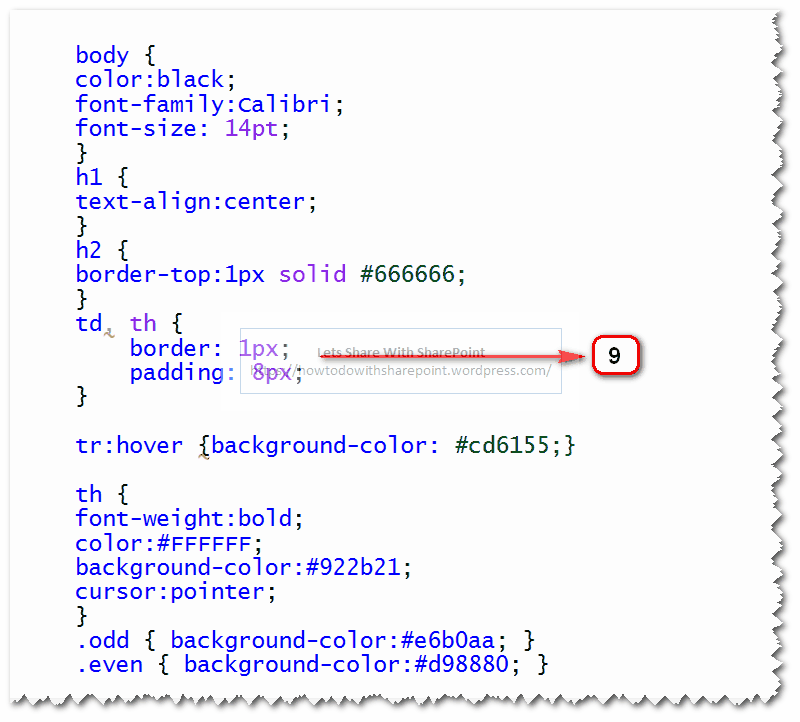
Step 9 shows the CSS file that we referred with “ConvertTo-EnhancedHTML†in Step 6
Step 10 shows the HTML outcome log file generated after we successfully executed the steps above

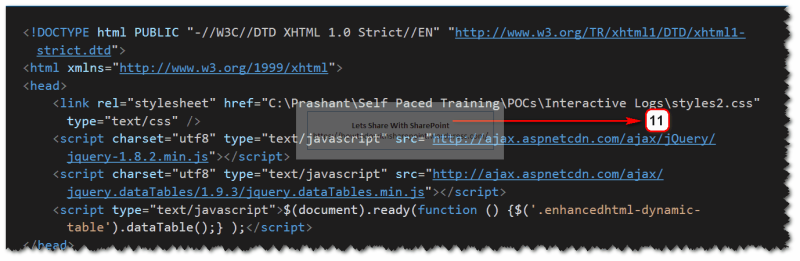
In Step 11 & 12 we can explore the html generated as part of this execution and it is amazing to see how this HTML is structured by adding references to the required JavaScript files and body elements.
It can be clearly noticed the generated html body content is in the form of table structure, this happened since we specified “-As Table†switch with “ConvertTo-EnhancedHTMLFragment†cmdlet in Step 5
Also we can notice the “<h1>†tag in the HTML body, it is the same content that we include to the fragment using “-PreContent†switch with “ConvertTo-EnhancedHTMLFragment†cmdlet in Step 5

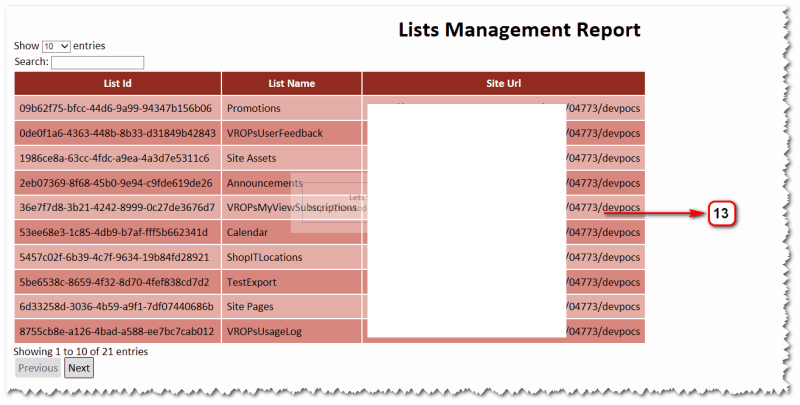
And finally we can see the HTML based interactive logs in Step 13 shown below. This would be feature rich HTML Page and we can even further add more feature as per our needs, thought this would cost additional effort.
That is all for this demo.
Hope you find it helpful.
 UXPin Blog
  EdTechReview
  Scripting Library
 Healthcare Exchange Standards
 Academic Transformations
  TeacherCast