 TechNuovo
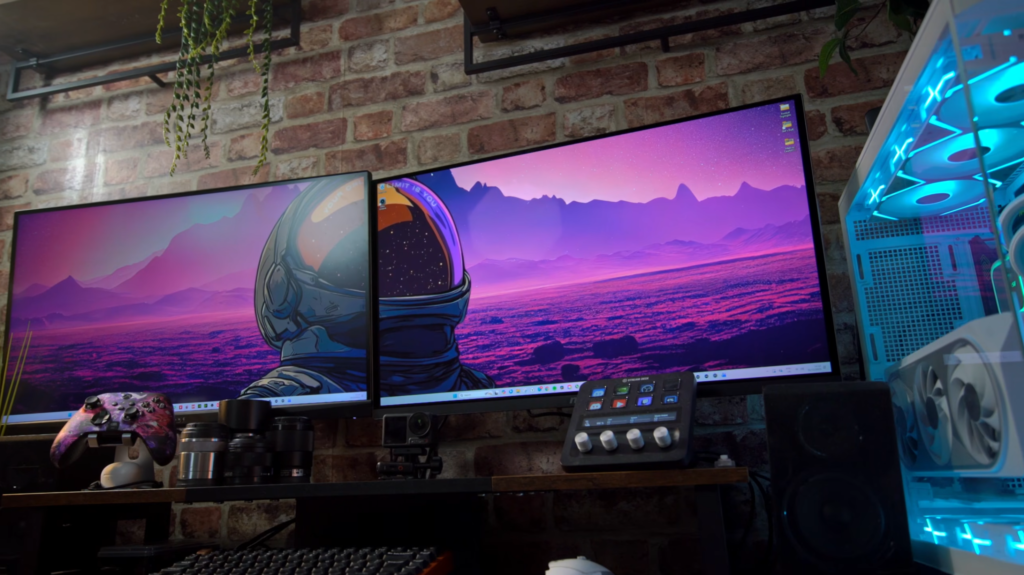
 I find getting new tech a bit stressful sometimes, especially when my own money is involved. I do spend lots of time researching what to buy, and when I do finally pull the trigger, I get a bit antsy with knowing if I’ve made the right decision. It was like that when I purchased my new monitor, an MSI 273QP QD-OLED to replace one of my broken MAG274QRF-QD. I had two of them on my setup, and it was great and looked lovely and uniform. The new OLED panel cost me £400 at the time of making this video from Amazon, and yes, I ummed and ahhed about it for a while after I got it, worrying that I’d done the wrong thing. Even to the point of having to sit my girlfriend in front of my old monitor and new monitor, asking if she could tell the difference in image quality. She could and said I was being stupid. So why am I still sitting here thinking I’ve done the wrong thing?
Well, for starters, the new screen is actually 26.5 inches rather than 27 inches, so the panels don’t line up perfectly at the top and bottom anymore. The new OLED panel has a smaller bottom bezel, and it sits lower on my monitor bracket. Something that I know is going to bother me somewhat if I keep the same stretched-out wallpaper on my PC. Secondly, it cost £400, and I could have gone for a slightly cheaper MPG274URFQD, though it has 75×75 VESA mounting and I needed 100×100 so a no go there. I could have also gone a lot cheaper and picked up something like a MAG275QF but then I’d be losing more features VS what I had there already. So did I do the right thing in the end with the MSI 273QP QD-OLED? Well, I thought I’d talk about it because it’s now being used as my daily driver and well, I’m getting used to to. Well, trying to at least.
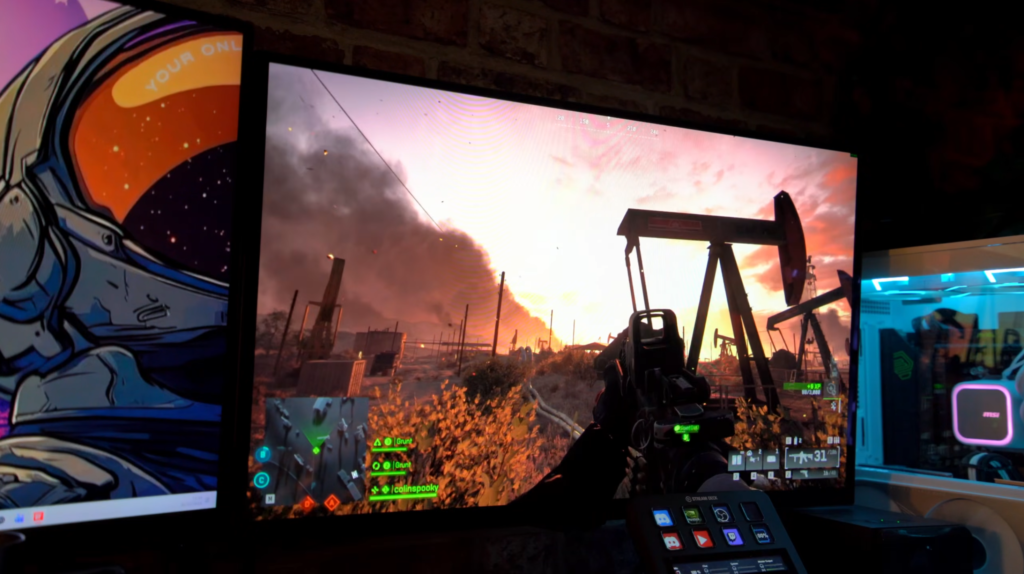
Anyway, the MSI 273QP QD-OLED is a 27-inch OLED panel is a 26 and a half inch screen with a 1440p resolution and a 240Hz refresh rate which I can say coming from my older 165Hz panel has been a welcome addition. It used quantum dot which equates to a much better vivid colours which again I am not complaining about with the upgrade. And this time around I have embraced HDR with its True Black 400 to really try and give that a proper test because I’ve been kind of quick to dismiss HDR in the future. I haven’t really done much to take advantage of it completely. It’s alright in what I have tried, but it hasn’t really been a mind-blowing experience. The monitor does have a Peak 1000 Nits mode, but between that and True Black 400, I’m sticking with the latter. Also the Peak 1000 mode turns web pages super grey, and as this monitor is also from time to time being used for work, the Peak 1000 nits brightness you may see in HDR content from time to time, doesn’t outweigh having to turn it on and off every time I want to play a game or use a browser. You’ve got an Adaptive Sync mode which works with G-Sync from 48Hz upwards.
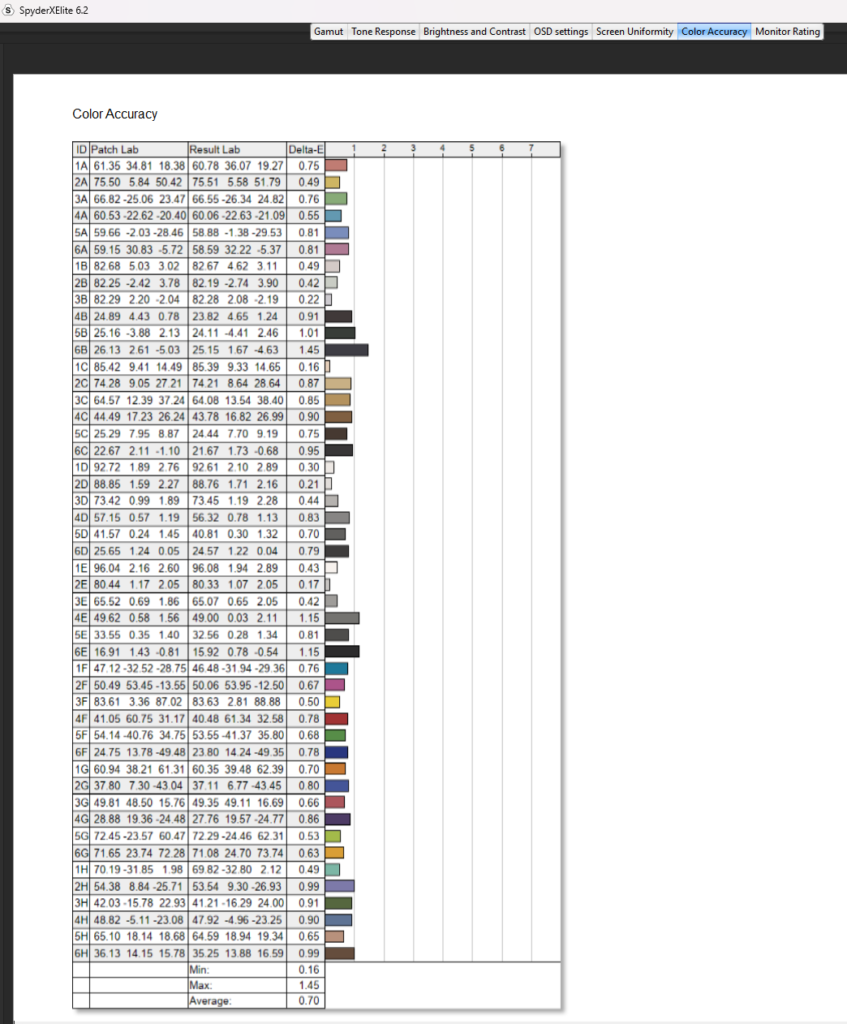
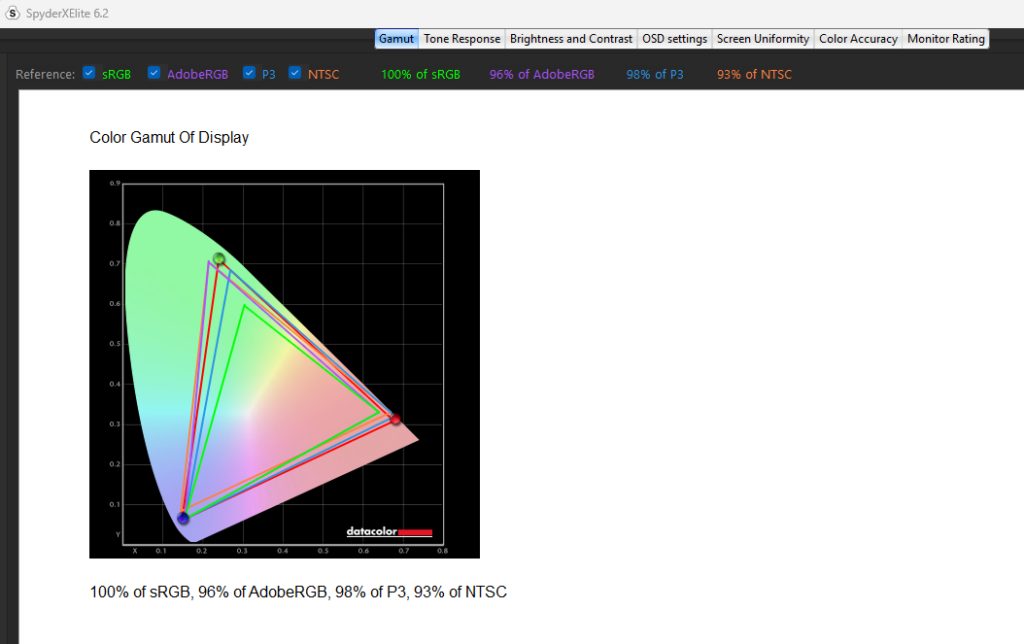
Testing the monitor using my Datacolor SpyderX gave me some very interesting results. In its sRGB mode the monitor achieved 98% sRGB, 74% AdobeRGB, 74% PC and 69% NTSC. It also threw back an Average Delta-E of 0.73 which was very good and a max of 4.57. However, switching over to its User mode, it gave me 100% sRGB 96% AdobeRGB, 98% PC and 93% NTSC. Its Delta-E was an average of 0.7 and a maximum of 1.45, so a much smaller window. Overall, best performing mode. But the OLED screen also comes with what’s caleld Premium Colour, and it gave me 100% sRGB, 96% AdobeRGB and 98% P3. Though its average Delta-E skyrocketed to 3.13 with an average of 6.66. So not great there, and I must say the reds look stupidly oversaturated in this mode. I stuck with the User image mode for the majority of my testing, and am still using the monitor in this mode today.
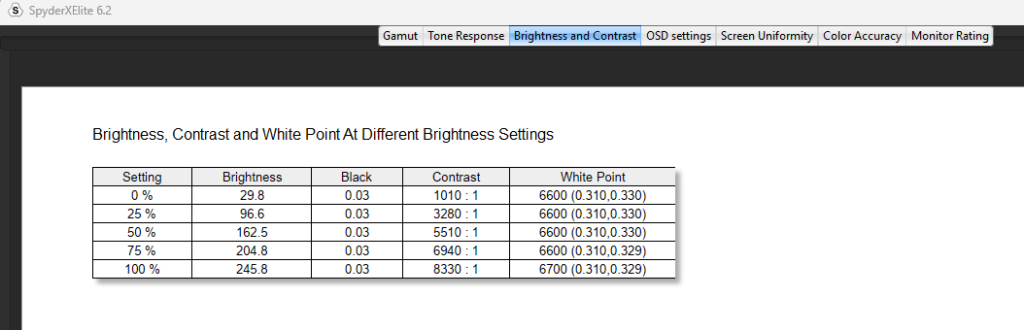
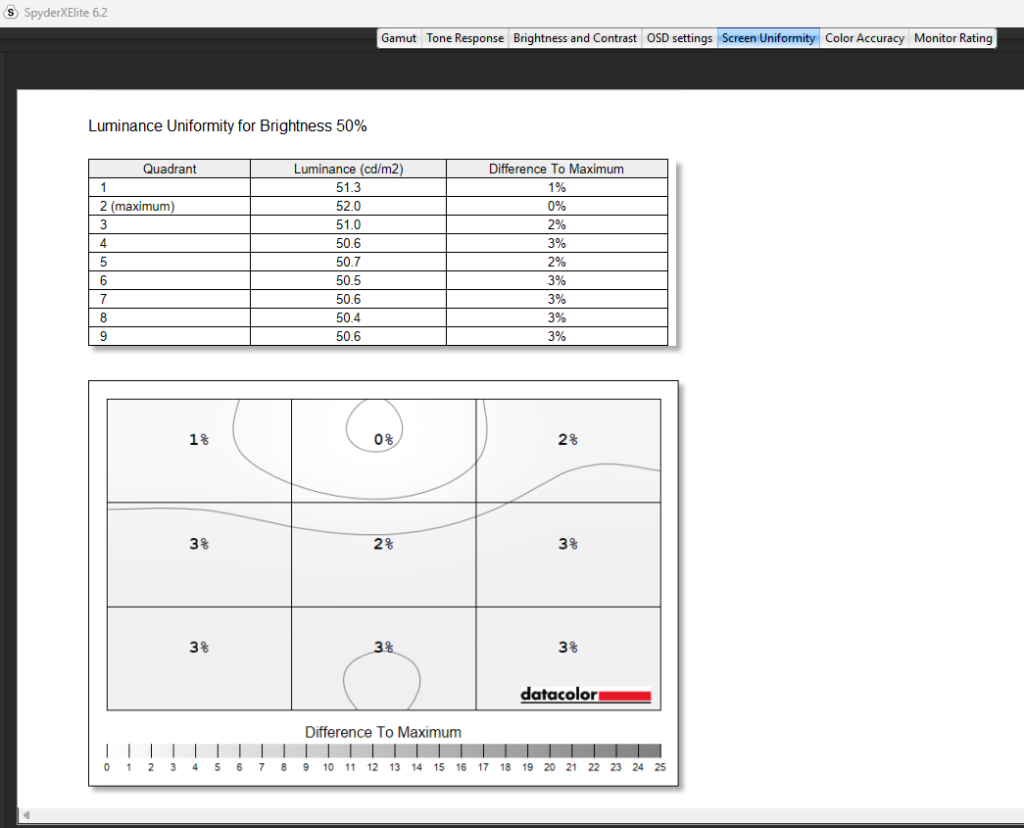
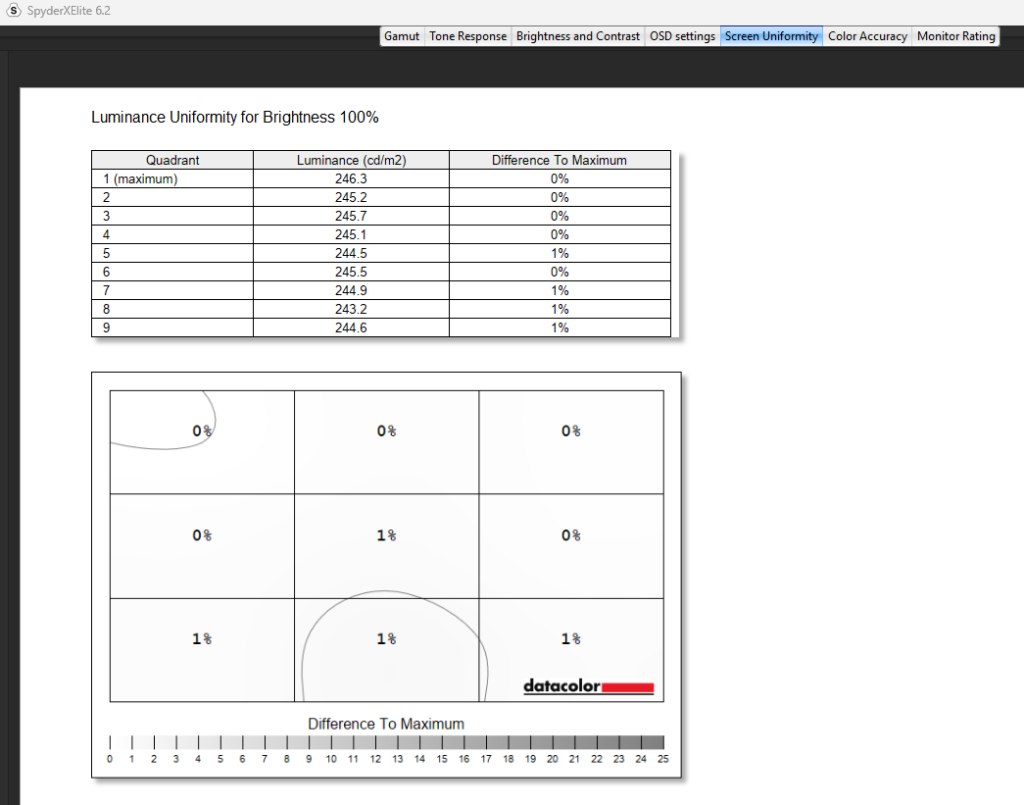
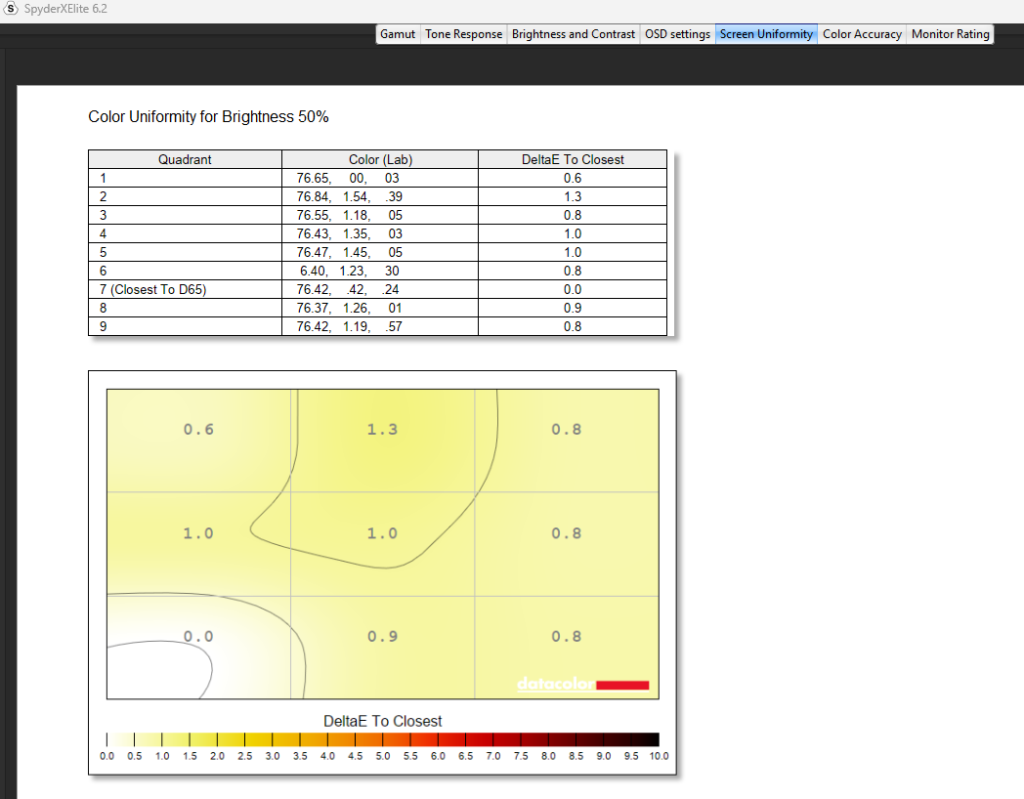
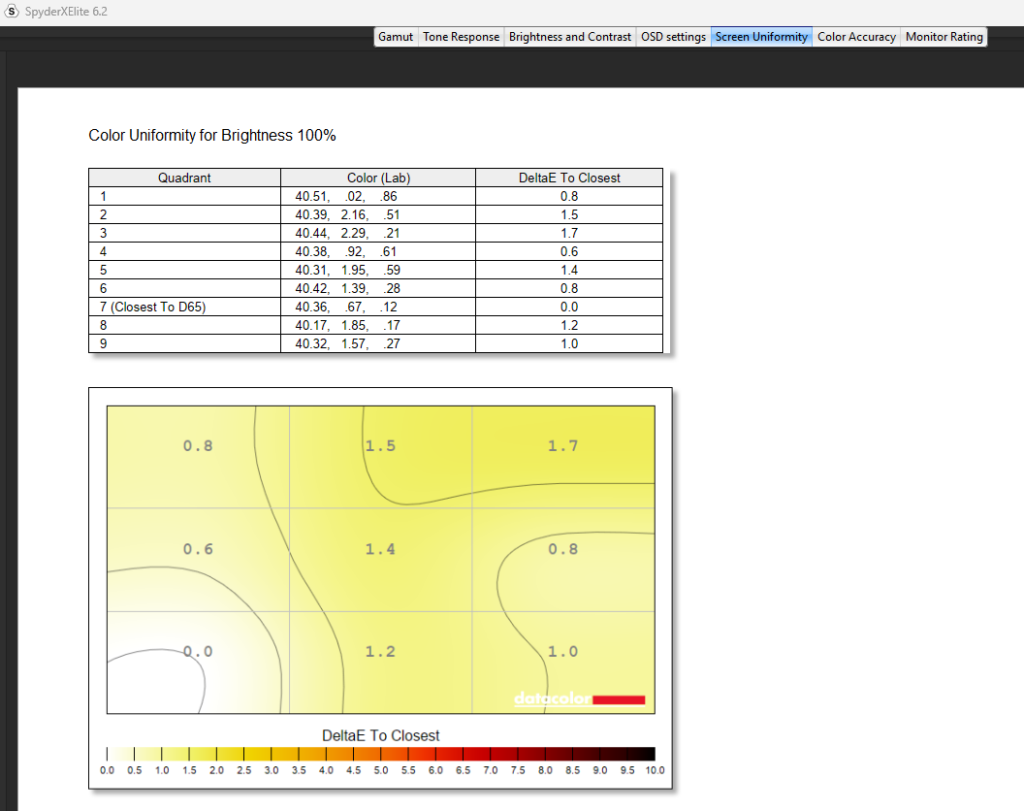
At 100% brightness in SDR, the panel achieved a max brightness of 246 nits, a contrast ratio of 8,330:1, which was fantastic, and a white point of 6,700. Though dropping this down to 50% brightness dropped the contrast to 5,510:1 and a 6,600 white point. Colour uniformity at 100% brightness was absolutely on point, and dropping it down to 50% brightness only yielded better results. Same with the luminance uniformity of the monitor. It’s wonderful.
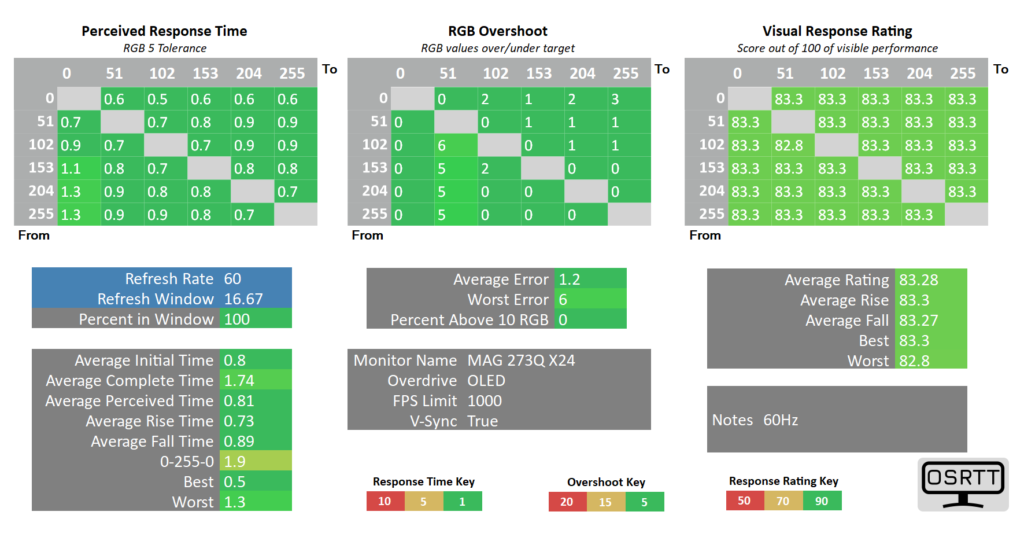
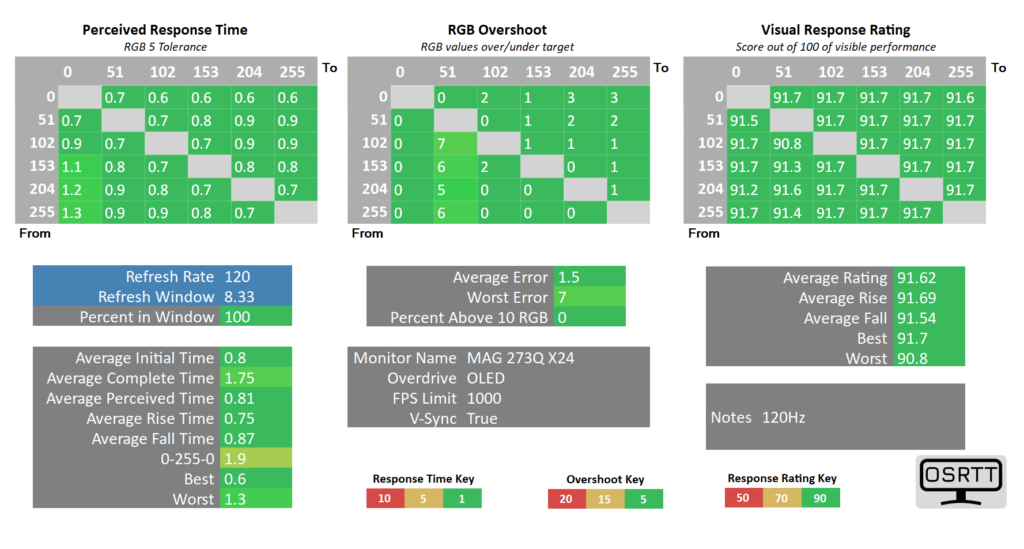
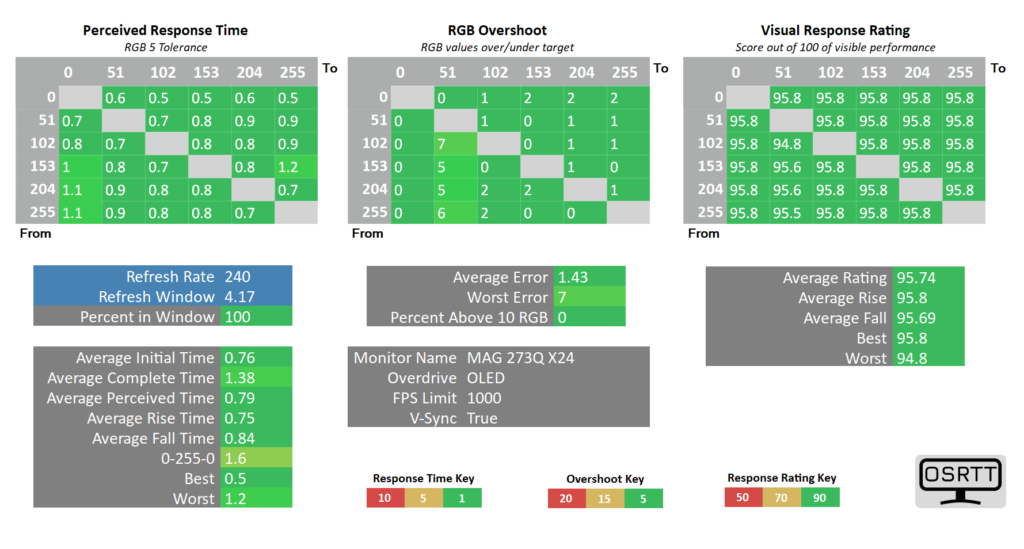
Testing the response time using my OSRTT tool, the panel at 240Hz gave me an initial time in window of 0.76 with a 100 percent in window. It also pretty much gave me zero RGB overshoot as my average error stuck at 1.43. Dropping this down to 120Hz, it spent again 100% in window with an average initial time of 0.8 and an average error of 1.5 for its RGB overshoot. And at 60Hz, it’s exactly the same really with nothing of concern. Okay, so maybe I’m overthinking now the panels not lining up on my system? Is this a worthy upgrade? a UFO Ghosting test too gave me pretty perfect results at 240Hz with zero ghosting appearing, as well as dropping this down to 120Hz. Both tests delivered exceptional results and it translated well into games because I have been blown away with the games I’ve played.
And I will say now that I have been experimenting a lot with the HDR functionality inside of games, and some of them work really well. Battlefield 6 for example worked superbly in certain conditions.
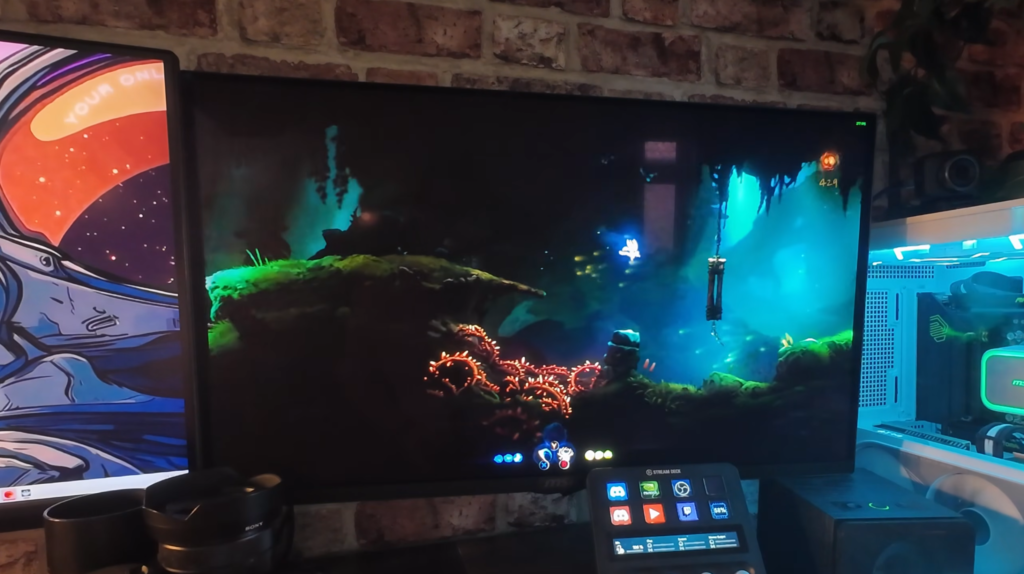
And I know that if you want to maximise your FPS in multiplayer games, then you’re not going to be playing at super high graphics settings anyway, but you’re missing out! And other games didn’t disappoint either. Hollowknight, The Outer Worlds 2 and even some Anno 117, all performed splendidly and gave me some really nice image quality and it’s definitely an upgrade from my previous IPS display I spoke about at the start of the review. Ori and the Will Of The Wisps was SUPER bright and I even turned down the HDR brightness setting to suit as things did start to look a little overexposed. I do also think with HDR images I’ve got to get used to the change in contrast between dark and light areas. It’s a far cry from how my IPS panel performed.
Being part of the MAG series, it’s basic when it comes to ports. You’ve only got a single DisplayPort 1.4 and two HDMI 2.1 inputs and a headphone jack. Unfortunately it’s missing USB Type-C and a USB hub which personally hasn’t been too much of a change from what I was using, but do be aware that if you wanted this on your monitor, you’re going to have to start looking at the MPG series which is basically the mid-range premium series of MSI monitors and do come with a bigger price tag, though chances are you’ll also be getting a 4K image as opposed to a 1440p image. The stand is also pretty basic too with some tilt and swivel, and rotation functionality. As I mentioned, I’ve got mine on the monitor bracket on the wall, so I’ve no use for the stand at all with my current setup.
But the big question is, am I going to be keeping it for the foreseeable future? Absolutely. And yes, while the few things I mentioned at the start have bothered me somewhat, when I fired up some games and saw that lovely OLED image with the inky blacks and colour reproduction, I knew that I wanted to keep hold of it. I love it. And yes, while £400 is a lot, well in terms of OLED panels it’s not, I do believe it’s been a worthy upgrade from my last MSI IPS display. But let me know in the comments what you think.
The post Was buying the MSI MAG 273 QP QD OLED Monitor a mistake? appeared first on TechNuovo | Bitesized tech news and reviews.
 Miami International Yacht Sales Blog
 Slick Vapes Blog
 E-zoomed
  Retro Gamer Magazine
 MedCity News